Choosing a graphics card can feel overwhelming, especially when dozens of models appear similar at first glance. This is where a GPU hierarchy becomes incredibly useful. Rather than comparing specifications one by one, a graphics card ranking system organizes GPUs according to real-world performance, helping buyers understand which models offer entry-level, mid-range, high-end, or enthusiast-grade capabilities.
Whether you’re building a gaming PC, upgrading an existing system, or selecting hardware for creative workloads, understanding how graphics cards stack up against each other can save time, money, and frustration.
What Is a GPU Hierarchy?
A GPU hierarchy is a structured ranking of graphics processing units based on their overall performance. These rankings typically consider gaming benchmarks, rendering speed, ray tracing capability, power efficiency, memory configuration, and productivity performance.
Instead of relying solely on specifications like VRAM or clock speeds, a hierarchy evaluates how a GPU performs in practical situations. This makes it easier to compare products across different generations and manufacturers.
For example, a newer mid-range graphics card may outperform an older flagship model despite having seemingly lower specifications on paper.
Why GPU Rankings Matter
Graphics cards represent one of the most significant investments in a PC build. Purchasing a model without understanding its position in the performance ladder can lead to either overspending or underwhelming results.
A performance hierarchy helps users:
- Compare GPUs quickly
- Identify the best value options
- Avoid outdated hardware
- Plan future upgrades
- Match performance to specific workloads
I learned this firsthand while upgrading my own gaming system; comparing benchmark-based rankings helped me avoid spending extra on a card that offered only marginal improvements over a more affordable alternative.
The Major GPU Performance Tiers
Graphics cards are generally grouped into several categories based on their capabilities.
Entry-Level GPUs
These cards focus on affordability and basic gaming performance. They are ideal for:
- Esports titles
- Casual gaming
- Home office systems
- Multimedia consumption
Most entry-level options handle games such as Valorant, League of Legends, and Rocket League without difficulty at 1080p resolution.
Mid-Range GPUs
The mid-range segment is often considered the sweet spot for many users. These graphics cards provide strong 1080p and capable 1440p gaming performance while maintaining reasonable pricing.
Benefits include:
- Higher frame rates
- Better visual settings
- Improved power efficiency
- Strong value-to-performance ratio
For many gamers, this tier delivers the best balance between cost and capability.
High-End GPUs
High-end models target enthusiasts who demand excellent performance at higher resolutions.
These cards are suitable for:
- 1440p ultra settings
- 4K gaming
- Content creation
- Advanced rendering workloads
They often feature larger memory capacities and more advanced technologies that improve visual quality and performance.
Enthusiast and Flagship GPUs
At the top of the hierarchy sit flagship graphics cards designed to deliver maximum performance.
These premium GPUs excel in:
- Native 4K gaming
- High-refresh-rate gaming
- Professional creative tasks
- AI-assisted workloads
- Intensive ray tracing applications
While impressive, these products typically offer diminishing returns for average users.
Comparing GPU Tiers
The table below provides a simplified view of how different performance levels compare.
| Tier | Typical Resolution | Gaming Performance | Best For |
|---|---|---|---|
| Entry-Level | 1080p | Medium to High Settings | Casual Gamers |
| Mid-Range | 1080p / 1440p | High Settings | Most PC Users |
| High-End | 1440p / 4K | Ultra Settings | Enthusiast Gamers |
| Flagship | 4K and Beyond | Maximum Settings | Professionals and Power Users |
This comparison illustrates why selecting a graphics card should involve more than simply buying the most expensive model available.
Factors That Influence GPU Placement
Several elements determine where a graphics card sits within a performance ranking.
Raw Processing Power
Shader counts, compute units, and overall architecture contribute significantly to performance.
Modern GPUs can achieve substantial gains through architectural improvements even when specifications appear similar to older generations.
Memory Capacity and Bandwidth
VRAM plays an important role in handling textures, high resolutions, and demanding applications.
Higher memory bandwidth allows the GPU to process large amounts of graphical data more efficiently.
Ray Tracing Performance
Realistic lighting and reflections have become increasingly important in modern games.
Some graphics cards handle ray tracing workloads significantly better than others, influencing their position in performance charts.
Upscaling Technologies
AI-assisted image reconstruction techniques allow GPUs to achieve higher frame rates while maintaining image quality.
Cards with stronger support for these technologies often deliver better overall gaming experiences.
Power Efficiency
Performance alone does not determine hierarchy placement. Energy consumption and thermal efficiency are becoming increasingly important considerations.
A card that delivers similar performance while consuming less power may offer greater long-term value.
How GPU Rankings Influence Buying Decisions
Imagine a gamer planning to upgrade from a five-year-old graphics card to play newly released titles.
Without a hierarchy chart, they might focus only on VRAM size or product naming conventions. However, by reviewing performance rankings, they discover that a modern mid-range GPU outperforms several older high-end models while consuming less power and costing significantly less.
As a result, they achieve smoother gameplay, lower electricity usage, and a more balanced system without exceeding their budget.
This practical advantage explains why performance hierarchies remain one of the most valuable tools for PC buyers.
Gaming Performance vs Productivity Performance
Not every graphics card excels equally across all workloads.
Some GPUs are optimized primarily for gaming, while others perform exceptionally well in:
- Video editing
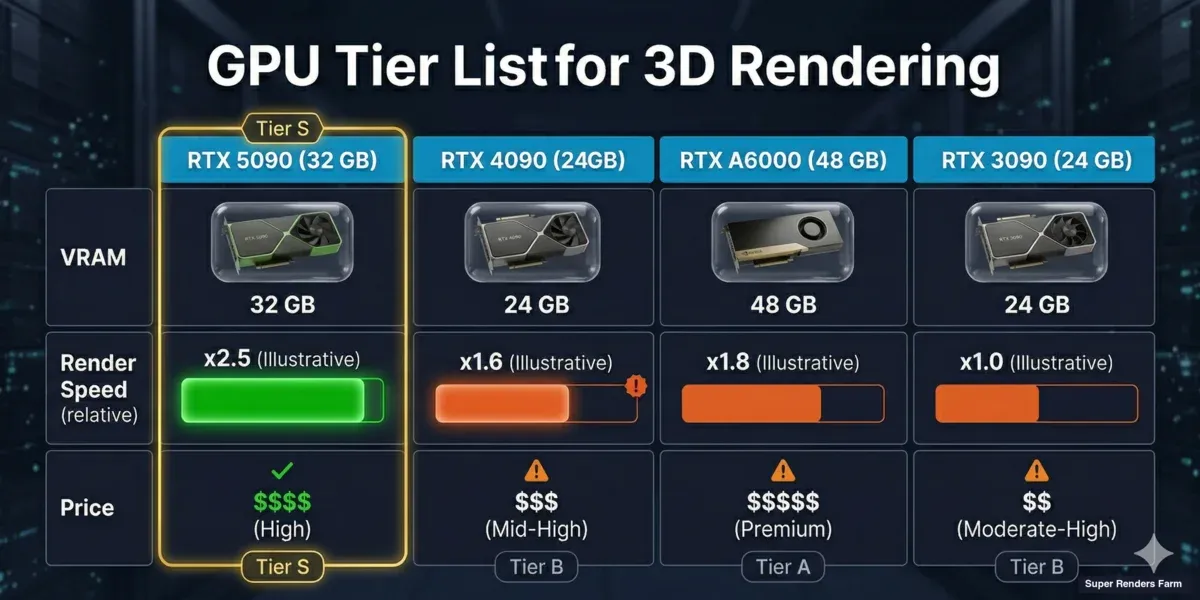
- 3D rendering
- Animation
- Machine learning
- CAD applications
A GPU that ranks highly for gaming may not necessarily be the best choice for professional productivity tasks.
Understanding your primary workload helps ensure you select hardware aligned with your specific needs rather than chasing benchmark numbers alone.
How Often Does the GPU Hierarchy Change?
The graphics card market evolves rapidly.
New generations typically introduce:
- Improved architectures
- Faster memory
- Better efficiency
- Enhanced software support
As a result, hierarchy rankings shift regularly. A GPU considered high-end today may move into the upper mid-range category within a few years as newer products enter the market.
For this reason, it is wise to consult updated performance data before making a purchase decision.
Common Misconceptions About GPU Rankings
More VRAM Always Means Better Performance
While memory capacity is important, overall architecture and processing power often have a greater impact on performance.
Higher Price Guarantees Better Value
Expensive cards usually deliver more performance, but not always the best performance-per-dollar ratio.
Newer Means Faster
Not every new release surpasses every older model. Some previous-generation premium cards remain highly competitive.
Brand Alone Determines Quality
Performance varies by model, architecture, and intended market segment rather than brand name alone.
Finding the Best Position in the Hierarchy for Your Needs
The ideal graphics card is rarely the highest-ranked option.
Instead, consider:
- Your monitor resolution
- Refresh rate goals
- Game preferences
- Creative workloads
- Budget constraints
- Power supply limitations
A balanced approach often leads to better satisfaction than pursuing top-tier hardware unnecessarily.
Understanding where a GPU sits within the broader performance landscape allows you to invest wisely and maximize value from your purchase.
Also Read:Best UHD Monitors 2026: Top 4K Displays for Every Need
Conclusion
A GPU hierarchy provides a clear and practical way to evaluate graphics cards beyond marketing claims and technical specifications. By organizing hardware into performance-based tiers, it becomes easier to identify the right option for gaming, content creation, or professional workloads.
Rather than focusing solely on price, VRAM, or model names, understanding relative performance helps users make informed decisions that align with their goals and budget. Whether you’re shopping for an entry-level card or a flagship powerhouse, knowing where a GPU fits within the hierarchy can be the difference between an average upgrade and a truly worthwhile investment.
Frequently Asked Questions
What does GPU hierarchy mean?
GPU hierarchy refers to a ranking system that organizes graphics cards according to their overall performance in gaming, productivity, and other workloads.
Which GPU tier is best for 1440p gaming?
Mid-range and high-end graphics cards are generally the best choices for smooth 1440p gaming, depending on desired settings and frame rates.
Does a higher-ranked GPU always provide better value?
Not necessarily. Higher-ranked models offer greater performance, but the best value often comes from mid-range options that balance cost and capability.
How often should I check updated GPU rankings?
Checking updated rankings before purchasing is recommended because new releases frequently change the competitive landscape.
Is VRAM the most important factor when comparing GPUs?
No. VRAM matters, but architecture, processing power, memory bandwidth, efficiency, and software support all play significant roles in overall performance.
Can older high-end GPUs outperform newer budget models?
Yes. Many previous-generation flagship graphics cards continue to outperform modern entry-level options despite their age.