Whether you’re working remotely, attending online classes, streaming content, or catching up with family over video calls, a reliable webcam can make a noticeable difference. The good news is that you don’t need to spend hundreds of dollars to get sharp video quality and dependable performance. Today, there are plenty of affordable options that deliver excellent results without stretching your budget.
If you’re searching for the best webcams under 100, this guide highlights standout choices that balance image quality, features, ease of use, and value.
Why a Good Webcam Matters
Built-in laptop cameras have improved over the years, but many still struggle with low-light performance, color accuracy, and overall sharpness. An external webcam offers better image quality, more flexibility in positioning, and features designed specifically for video communication.
A quality webcam can help you look more professional during meetings, improve audience engagement during livestreams, and create a better experience for anyone on the other side of the screen.
What to Look for in an Affordable Webcam
Before choosing a camera, consider the following factors:
Resolution
Most modern webcams support either 720p or 1080p video. Full HD 1080p is generally the sweet spot for clear and detailed video.
Frame Rate
A frame rate of 30 frames per second is sufficient for video conferencing. Gamers and streamers may prefer 60 fps for smoother motion.
Autofocus
Autofocus helps maintain a sharp image even when you move around. This feature is particularly useful for presentations and content creation.
Microphone Quality
Many webcams include built-in microphones. While dedicated microphones often provide better audio, integrated mics can be convenient for everyday calls.
Low-Light Performance
If your workspace doesn’t have perfect lighting, look for models with automatic light correction.
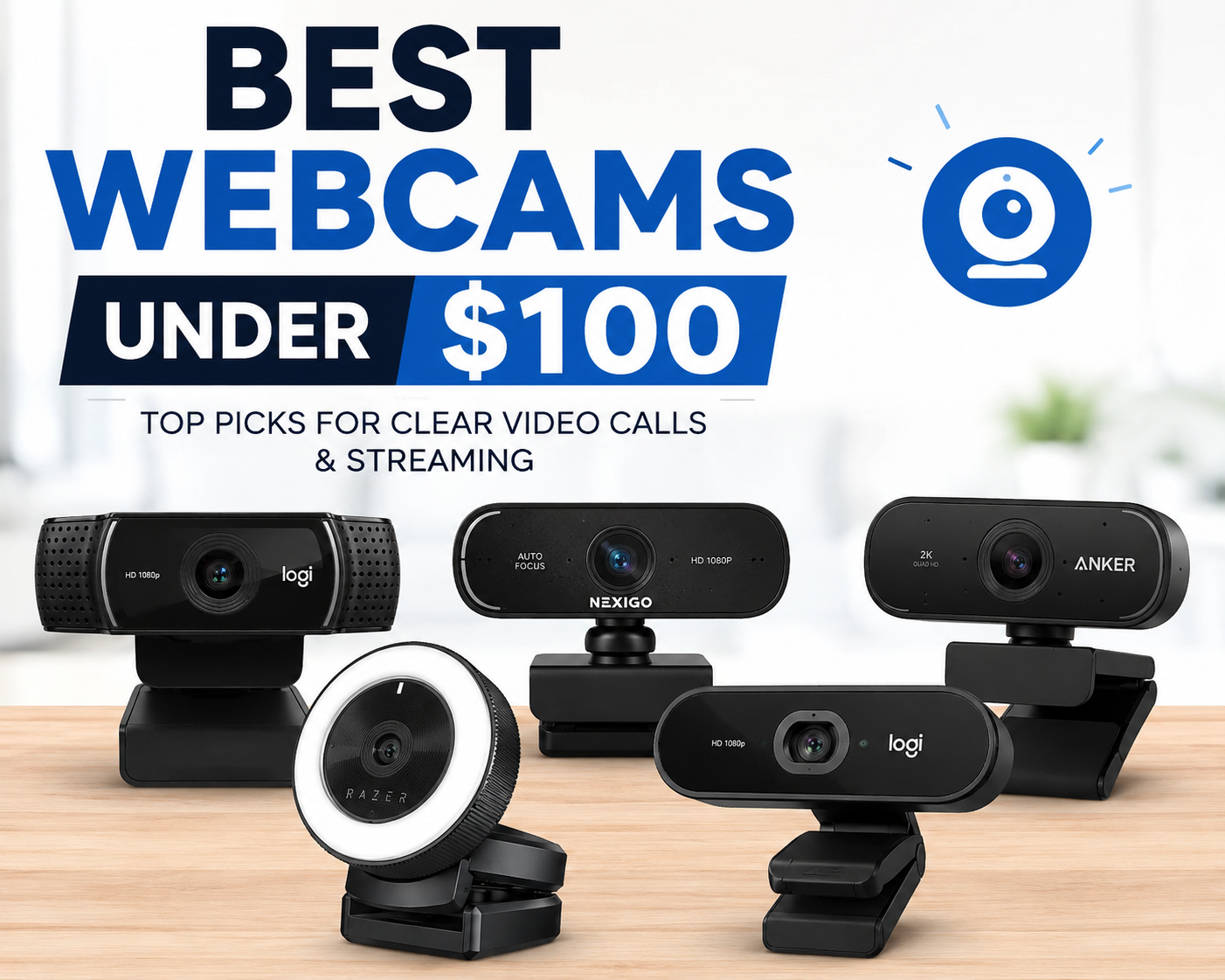
Top Webcams Under $100
Here are some of the most recommended options currently available.
| Webcam | Resolution | Frame Rate | Best For | Approx. Price |
|---|---|---|---|---|
| Logitech C920 HD Pro | 1080p | 30 fps | Remote work and meetings | $60-$80 |
| Logitech C922 Pro Stream | 1080p | 60 fps at 720p | Streaming and gaming | $80-$99 |
| Anker PowerConf C200 | 2K | 30 fps | Professionals seeking sharper video | $60-$70 |
| NexiGo N660P | 1080p | 30 fps | Budget-conscious buyers | $40-$60 |
| Razer Kiyo | 1080p | 30 fps | Content creators and streamers | $70-$99 |
Logitech C920 HD Pro
The Logitech C920 remains one of the most trusted webcams on the market. Despite being available for several years, it continues to deliver impressive image quality for video meetings and online communication.
Its Full HD resolution, dependable autofocus, and natural color reproduction make it a favorite among professionals and students alike.
Key Advantages
- Crisp 1080p video
- Reliable autofocus
- Dual stereo microphones
- Wide software compatibility
For most users, this model strikes an ideal balance between performance and affordability.
Logitech C922 Pro Stream
If streaming is part of your routine, the Logitech C922 deserves serious consideration. It offers smoother video output and performs particularly well for gaming streams.
Compared to the C920, the C922 provides enhanced streaming features while maintaining similar image quality.
The difference isn’t dramatic for business meetings, but content creators may appreciate the added flexibility.
Anker PowerConf C200
One of the newer competitors in the budget webcam category, the Anker PowerConf C200 offers impressive value.
Its 2K resolution provides extra sharpness, which can be especially noticeable during presentations or recorded content. It also includes adjustable field-of-view settings, allowing users to customize what appears in the frame.
I tested a similar high-resolution webcam during remote client meetings and immediately noticed how much clearer text and facial details appeared compared to older 1080p models.
NexiGo N660P
For buyers focused on maximizing value, the NexiGo N660P is worth considering.
It offers features often found in more expensive webcams, including autofocus and a privacy cover. Video quality remains surprisingly strong for its price range, making it suitable for students, remote workers, and casual users.
This model proves that affordability doesn’t have to mean sacrificing essential functionality.
Razer Kiyo
The Razer Kiyo stands out because of its built-in ring light. This feature helps improve image quality in dim environments without requiring additional lighting equipment.
Imagine joining an important job interview from a room with limited natural light. Instead of appearing grainy or shadowed, the integrated lighting helps maintain a clearer and more professional appearance.
For streamers and content creators working in smaller spaces, this added convenience can be incredibly useful.
Choosing the Right Webcam for Your Needs
Different users prioritize different features.
For Remote Work
The Logitech C920 and Anker PowerConf C200 are excellent choices for professional video calls.
For Streaming
The Logitech C922 and Razer Kiyo provide features that appeal to streamers, including smoother motion handling and enhanced lighting.
For Budget Buyers
The NexiGo N660P delivers strong overall performance while keeping costs low.
For Video Quality Enthusiasts
The Anker PowerConf C200’s higher resolution can provide noticeably sharper images than many competitors in the same price range.
Tips to Improve Webcam Quality
Even the best camera can benefit from proper setup.
- Position the webcam at eye level.
- Face a window or light source.
- Keep your lens clean.
- Use a simple, uncluttered background.
- Ensure a stable internet connection.
These small adjustments often improve video quality more than upgrading to a significantly more expensive camera.
Are Expensive Webcams Worth It?
For most people, webcams under $100 provide everything needed for video conferencing, streaming, online learning, and content creation.
Higher-end models may offer premium features such as 4K resolution or advanced AI tracking, but those benefits are often unnecessary for everyday use.
Many affordable webcams now deliver professional-looking video that would have required a much larger investment just a few years ago.
Also Read:How to Check SSD Health and Improve Drive Performance
Conclusion
Finding the best webcam under $100 is easier than ever thanks to the wide range of high-quality options available today. Whether you’re attending virtual meetings, launching a streaming channel, teaching online classes, or staying connected with loved ones, there is a budget-friendly webcam that fits your needs.
The Logitech C920 remains an all-around favorite, the Logitech C922 appeals to streamers, the Anker PowerConf C200 offers impressive clarity, the NexiGo N660P delivers excellent value, and the Razer Kiyo shines in low-light environments. By matching your priorities with the right features, you can significantly upgrade your video quality without overspending.
Frequently Asked Questions
What is the best webcam under $100 for Zoom meetings?
The Logitech C920 is widely regarded as one of the best choices for Zoom and other video conferencing platforms because of its dependable image quality and ease of use.
Is 1080p enough for a webcam?
Yes. Full HD 1080p resolution is more than sufficient for video calls, online classes, streaming, and most content creation tasks.
Can I use a webcam for streaming?
Absolutely. Many affordable webcams are specifically designed for streaming and provide excellent image quality for platforms such as Twitch and YouTube.
Do webcams work with laptops and desktop computers?
Most modern webcams support both Windows and macOS systems and connect through a standard USB port.
Is autofocus important in a webcam?
Autofocus helps maintain image sharpness when you move around. It is particularly beneficial for presentations, streaming, and professional meetings.